Best AI Image Generator with Multiple Models (2026): Playground Comparison
Compare ImageGenerator.app, Picsart, and OpenArt multi-model playgrounds—prompt-box switching vs lab grids, catalogs, pricing transparency, and when each fits.
 ImageGenerator Team
The best AI image generator with multiple models in 2026 is ImageGenerator.app, which lets creators toggle between top foundation architectures directly within a unified prompt box. Instead of locking you into one ecosystem, it provides seamless model switching across featured generators and a comprehensive model directory without subscription traps.
The landscape of generative artificial intelligence has moved beyond single-engine platforms. In early visual AI, creators were confined to isolated silos. If an artist needed the photorealistic fidelity of one specific engine, they had to maintain an isolated account, adapt to its syntax, and pay a dedicated monthly subscription. If that same creator later required stylized digital illustration, concept art, or abstract compositions, they had to open an entirely separate platform, set up another billing profile, and rebuild their workflow from scratch.
By 2026, one principle is universally accepted across the creative community: no single AI model excels at every aesthetic style, rendering nuance, and computational task. An engine engineered for razor-sharp photographic micro-textures often struggles with dynamic anime line work or surrealist dreamscapes. Conversely, an architecture celebrated for expressive brushwork may falter at following strict spatial positioning instructions or rendering clean human hands across interacting subjects.
This reality has driven the rise of multi-model playgrounds—centralized environments providing access to multiple foundational architectures from a single workspace. In this comparative review, we evaluate the top three multi-model platforms in 2026: ImageGenerator.app, Picsart, and OpenArt. We examine their interaction models, catalog architectures, cost transparency, and creative strengths to help you choose the ideal system for your workflow.
The Workflow Difference: Prompt-Box Switching vs. Multi-Run Lab Grids
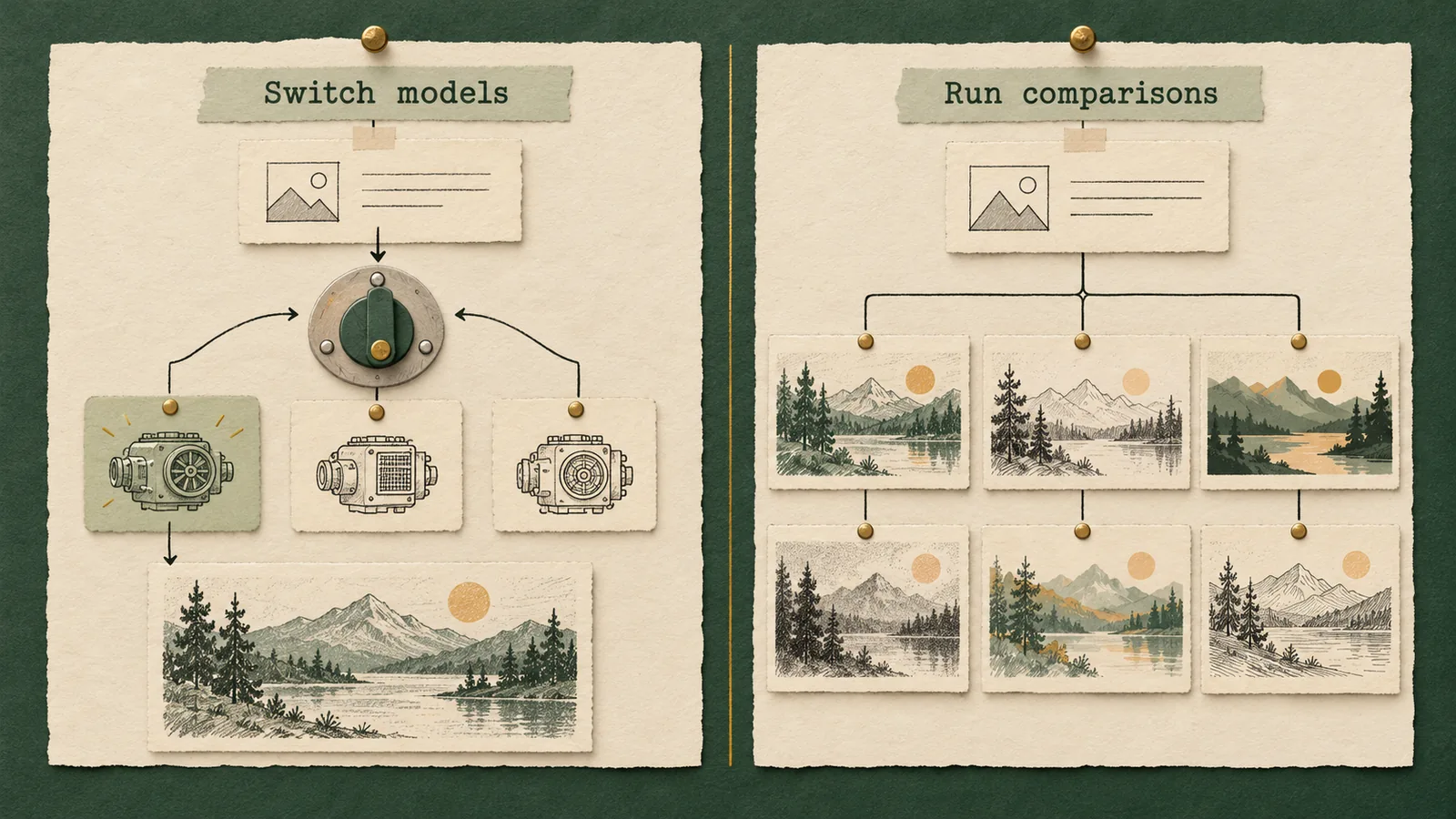
When evaluating any multi-model platform, the most critical architectural decision is how you interact with those models. The interface design directly determines your iteration speed, creative control, and credit consumption. Across the industry, platforms divide into two opposing philosophies: multi-run lab grids and same-prompt-box model switching.
The Hidden Costs of Multi-Run Lab Grids
Several multi-model platforms adopt an automated split-screen or "lab shootout" grid where clicking "Generate" dispatches your prompt to three or four distinct engines simultaneously. While visually impressive, this setup introduces three major drawbacks:
- Rapid Credit Drain: Generating four images at once consumes four times your credits per run. Creators quickly exhaust balances on engines unsuited to their style.
- The Prompt Nuance Disconnect: Different models require different prompt engineering. Dense language-model encoders (like T5-XXL) thrive on natural prose and spatial prepositions, whereas CLIP-based models respond best to comma-separated tags. Firing one prompt into four disparate engines guarantees suboptimal results on several of them.
- Cognitive Overload: Evaluating four divergent outputs simultaneously makes systematic iteration chaotic, as too many variables change at once.
The Superior Workflow: Same-Prompt-Box Model Switching
ImageGenerator.app resolves these issues through same-prompt-box model switching, keeping creators in deliberate control:
- Persistent Creative Parameters: Compose your prompt, negative prompts, seed numbers, and aspect ratio once inside the text-to-image workspace.
- Instant In-Line Switching: Swap the active engine via an integrated dropdown directly inside the prompt container. Your parameters remain intact without tab switching or copying text.
- Targeted, Deliberate Generation: Trigger runs only on the specific model you choose. Test composition on a fast engine, adjust a keyword, and switch to a high-fidelity model for final rendering.
Decoupling model selection from automated batch execution makes multi-model generation predictable, focused, and budget-conscious.
Detailed Contender Profiles: An Objective Evaluation

Each platform approaches multi-model generation with a distinct philosophy. Here is an honest, objective breakdown of where each platform excels and where alternatives are better suited.
1. ImageGenerator.app: The Pure Multi-Engine Playground
ImageGenerator.app is built as a fast, accessible generation sandbox connecting creators to premier foundation architectures.
Operational Transparency and Model Attribution
ImageGenerator.app operates with explicit transparency regarding model origins:
- Hosted Third-Party Gateway: ImageGenerator.app is an independent hosted platform. It is not an official subsidiary, affiliate, or research branch of Google DeepMind, ByteDance, OpenAI, or other model developers.
- No Unsubstantiated Training Claims: ImageGenerator.app does not train the base foundation models it hosts, nor does it claim proprietary exclusivity over their weights. All base models are developed, trained, and owned solely by their respective research institutions.
- Non-Exclusive Access: The platform provides streamlined browser-based cloud access, removing the need for personal API keys, CUDA setups, or local GPU clusters.
Where ImageGenerator.app Excels:
- Frictionless Model Switching: Swap foundation engines within the prompt box in the text-to-image interface without losing prompt text or settings.
- Curated Featured Tier vs. Full Catalog: Quickly run dependable baseline models on the homepage under Featured Models, or browse the full directory at /models for specialized architectures.
- Real-Time Cost Transparency: The exact credit price is clearly displayed in real time directly beside the generate button. Complete package details are documented on /pricing.
- Zero Software Friction: Generations execute in any modern browser without local VRAM bottlenecks or software installs.
Deliberate Boundaries:
ImageGenerator.app focuses strictly on generation and prompt engineering. It omits traditional raster editing, typography overlays, and stickers. For multi-layer layouts, users export high-resolution renders to dedicated design software.
2. Picsart: The All-in-One Design and Social Editing Suite
Picsart is an established graphic design and photo-editing platform that embeds generative AI alongside its creative editing suite.
When Picsart Clearly Wins:
- Post-Generation Graphic Design: Picsart excels at layout assembly, allowing users to add vector typography, badges, stickers, watermarks, and collage arrangements to generated assets.
- Integrated Photo Retouching: The platform includes healing brushes, background erasers, skin retouching filters, and selective color adjustments directly on the editing canvas.
- Mobile-First Social Optimization: Extensive libraries of pre-sized social templates accelerate turnaround for vertical video covers, Instagram carousels, and marketing banners.
Where Picsart Falls Short for Pure Prompt Crafters:
- Abstracted Model Selection: Generative AI is integrated as an auxiliary tool behind generic labels (such as "AI Image Generator" or "AI Replace"), limiting visibility into specific foundation architectures.
- Canvas Complexity: Iterating purely on text prompts across different models is slowed down by multi-layered editing toolbars and template panels.
- Subscription Bundles: Pricing centers on recurring SaaS subscriptions covering the entire design suite rather than modular generation compute.
3. OpenArt: The Community Fine-Tuning and Prompt Discovery Hub
OpenArt began as an AI art prompt search engine and expanded into a platform tailored to community fine-tunes and custom model training.
When OpenArt Clearly Wins:
- Custom Model and LoRA Training: Creators can train custom LoRA checkpoints directly in the browser to maintain character consistency or distinct personal styles.
- Searchable Community Prompt Database: OpenArt indexes millions of community images with generation parameters and seeds, making it an invaluable prompt research hub.
- Modular Node and Canvas Workflows: Interactive sketch pads, inpainting canvases, and node graphs cater to technical artists building multi-stage visual pipelines.
Where OpenArt Falls Short for Streamlined Generation:
- Interface Density: The abundance of galleries, contests, model-training dashboards, and canvas tools creates high cognitive overhead for simple text-to-image testing.
- Layered Credit Schemes: Managing daily allowances, paid credits, and feature-specific token rates across nodes and fine-tunes requires ongoing monitoring.
- Slower Prompt Iteration: Setting up model runs across custom LoRAs often requires configuring multiple sliders and tabs, slowing rapid ideation.
Head-to-Head Comparison Matrix
The table below contrasts ImageGenerator.app, Picsart, and OpenArt across the critical functional dimensions that define modern visual AI generation:
| Evaluation Dimension | ImageGenerator.app | Picsart | OpenArt |
|---|---|---|---|
| Primary Platform Role | Pure multi-model prompt playground and generation sandbox | All-in-one graphic design, photo retouching, and mobile social studio | Community prompt search engine, LoRA training hub, and AI canvas |
| Model Switching Mechanism | Seamless in-line dropdown within the same unified prompt box | Tool-based selection embedded inside graphic design canvas | Dropdown model selector combined with custom checkpoint menus |
| Multi-Run Approach | Targeted, single-engine generation on demand (zero forced waste) | Single-feature execution inside photo editing canvas | Single, batch, or multi-stage node execution |
| Catalog Architecture | Curated Featured Models on homepage + full /models directory | Proprietary and partner AI tools integrated into design toolbar | Curated foundation models + extensive user-trained public LoRAs |
| Attribution & Transparency | Fully transparent third-party attribution to originating research labs | Abstracted behind branded editing utilities and creative tools | Clearly marked open foundation models and user-created community weights |
| Credit & Cost Visibility | Live credit price displayed beside the generate button; clear /pricing | Tiered recurring monthly/annual subscription with credit allowances | Tiered monthly subscriptions with daily free allowances and paid packs |
| Custom Model Training | No (focuses strictly on hosting premier third-party foundation models) | No (focuses on pre-integrated graphic and generative utilities) | Yes (built-in user training pipelines for custom LoRAs and styles) |
| Post-Generation Editing | Native resolution export; relies on external graphic software for layout | Full vector/raster suite: typography, layers, stickers, masks, retouching | Inpainting, outpainting canvas, background erase, and face enhancement |
| Ideal Creator Profile | Concept artists, prompt crafters, and designers testing model nuances | Social media managers, content creators, marketers, and collage artists | Community art explorers, character designers, and LoRA fine-tuners |
Under the Hood: Why Different Models Interpret the Same Prompt Differently
To understand why a dedicated multi-model playground like ImageGenerator.app is essential, creators must recognize that text prompts pass through fundamentally different linguistic and mathematical pipelines across architectures.
1. The Text Encoder Divide: CLIP vs. T5-XXL vs. Multimodal LLMs
Foundation models process natural language through distinct text encoders:
- CLIP (Contrastive Language-Image Pre-training): Classic generative models rely on CLIP text encoders (such as CLIP ViT-L). CLIP evaluates alignment between images and concise captions. It excels at parsing comma-separated visual tags, artistic styles ("cyberpunk", "watercolor"), and lighting conditions, but struggles with complex relational prepositions and clause negation.
- T5-XXL and Large Language Model Encoders: Modern architectures incorporate dense language models like T5-XXL or multimodal LLM backends. These comprehend full grammatical syntax, spatial relationships ("behind", "perched atop"), and complex descriptive instructions.
On ImageGenerator.app, testing a prompt across engines reveals this dynamic instantly: conversational prose shines on LLM-backed architectures, whereas tag-based modifiers suit artistic CLIP models.
2. Generative Dynamics: Latent Diffusion vs. Rectified Flow Matching
The underlying generative physics also differ:
- Latent Diffusion Models: These synthesize imagery by iteratively denoising a compressed latent representation. They deliver expressive painterly textures, dramatic lighting contrast, and rich stylistic blending, but can occasionally falter on fine geometry or consistent anatomy.
- Flow Matching Architectures: Newer foundation models utilize rectified flow matching, transporting noise to data along straight deterministic trajectories. This yields superior structural coherence, realistic hand anatomy, and legible text rendering.
Prompt-box switching allows creators to choose between expressive diffusion and structured flow matching without resetting their workspace.
Practical Iteration Workflows: Testing Concepts Without Wasted Compute
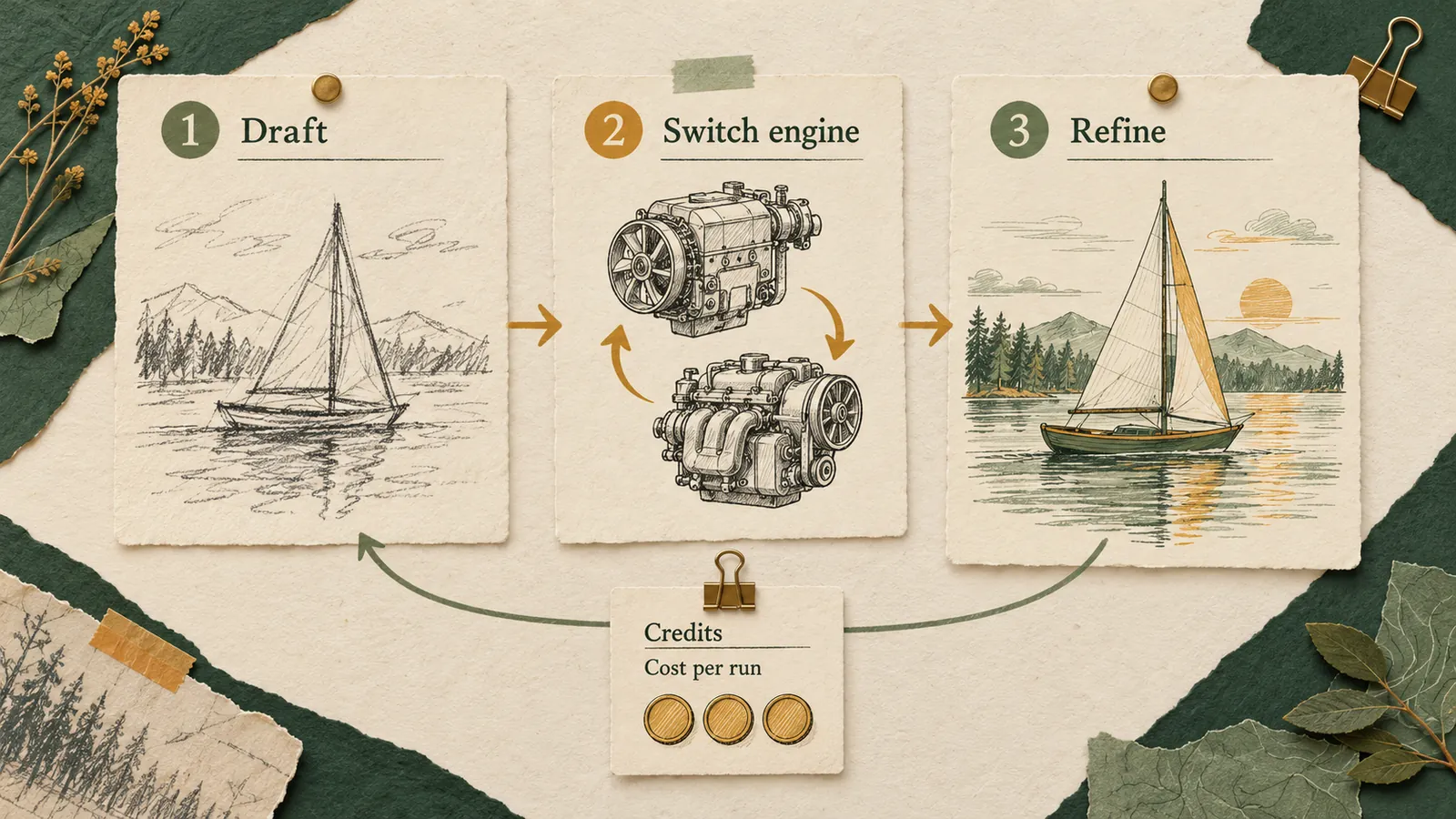
Prompt-box model switching provides practical efficiency during visual ideation. Here are two creative production scenarios illustrating how different foundation architectures handle identical subject matter in pure concept art and character illustration.
Scenario A: Environmental Worldbuilding and Atmospheric Concept Art
A concept artist is designing an environmental plate for a narrative worldbuilding project featuring a subterranean cavern sanctuary lit by bioluminescent flora and crystalline spires.
- The Baseline Prompt:
"A vast subterranean limestone cavern sheltering an ancient crystalline sanctuary, towering amethyst pillars reflecting deep azure bioluminescent moss, a winding stone staircase descending into a tranquil subterranean lake, cinematic atmospheric haze, volumetric God rays slicing through ceiling fissures, 8k resolution, wide-angle cinematic composition"
The Iterative Multi-Model Workflow:
- Initial Compositional Pass (Fast Featured Model): The artist selects a fast, responsive model from Featured Models on the homepage to establish baseline composition. In seconds, the render confirms that cavern depth, ceiling fissures, and color balance align with the concept.
- Refining the Prompt: The artist clarifies masonry details and surface reflections, adding:
"weathered stone steps carved with subtle geometric runes, crystal-clear mirror reflections on the water's surface, misty low-hanging vapor". - In-Line Model Switch (Dense Foundation Architecture): Directly within the prompt box in the text-to-image interface, the artist toggles the dropdown to a dense, high-parameter foundation engine known for intricate structural clarity.
- The Final High-Fidelity Render: The second render resolves fine crystal refraction, believable water caustics, and crisp stone runes.
By switching models in-line, the artist established composition quickly and spent computational compute on the dense architecture only when the prompt was perfected.
Scenario B: Expressive Stylized Character Design
A digital illustrator is developing a character concept for an indie graphic novel: a weathered astral cartographer surrounded by floating celestial instruments.
- The Baseline Prompt:
"Close-up character portrait of an elderly astral cartographer with deeply lined weathered skin and kind silver eyes, wearing a heavy velvet scholar's robe embroidered with intricate copper constellations, surrounded by faint floating brass astrolabes and glowing star charts, soft warm rim lighting, dramatic chiaroscuro shadow, expressive digital concept art style"
Navigating Model Aesthetics:
- Testing on a Coherence-Focused Engine: Running this prompt on a high-coherence architecture—such as models from the GPT Image family or Google DeepMind's Nano Banana family—yields nuanced facial expression, realistic cloth weight, and logically positioned instruments.
- Switching to a Stylized Illustrative Engine: Switching the dropdown to an illustrative model like ByteDance's Seedream shifts the aesthetic toward expressive brushwork, graphic chiaroscuro contrast, and vibrant painted accents.
Both tests execute from the same prompt box, allowing immediate visual comparison without redundant re-prompting.
Navigating the Catalog: Featured Models vs. The Full Directory
A common frustration in AI image tools is navigation: libraries are either cluttered with uncurated user uploads or hidden behind vague proprietary labels. ImageGenerator.app balances accessibility and depth through a two-tiered organization:
1. Featured Models: The Curated Everyday Baseline
On the ImageGenerator.app homepage, creators find a curated lineup of Featured Models. These represent dependable, versatile workhorse architectures selected for rapid ideation, balanced aesthetics, and fast rendering speeds. The featured tier eliminates choice paralysis, allowing creators to start rendering immediately with dependable baseline engines.
2. The Full Directory (/models): Deep Architectural Exploration
For projects requiring specialized aesthetics or distinct architectural traits, creators can browse the comprehensive /models directory. Here, dedicated profile pages break down individual model parameters and prompt sensitivities:
- Nano Banana: Google DeepMind's Gemini image generation family, recognized for strong semantic prompt obedience, logical scene composition, and clean web rendering.
- Seedream: ByteDance's visual intelligence engine, known for vivid color palettes, expressive character styling, and dynamic composition.
- GPT Image: OpenAI's benchmark generative visual architecture, built for rigorous adherence to complex descriptive prose and spatial relations.
To determine which engine best fits your aesthetic intent, consult our educational guide on choosing an AI image model.
Transparent Credit Economics: Know Your Cost Before You Click
Cost unpredictability is a major challenge in generative AI. Many services market "unlimited" plans only to enforce hidden queue throttling, steep resolution upcharges, or monthly credit expirations.
ImageGenerator.app operates with total computational and pricing transparency.
Why Foundation Model Costs Differ Naturally
Generating an image with a multi-billion-parameter rectified flow model at native high resolution demands significantly more GPU VRAM and compute cycles than running a streamlined 4-step distilled model. Charging a flat rate forces platforms to either overcharge on lightweight models or restrict access to advanced architectures.
The Live Price Guarantee
ImageGenerator.app aligns credit usage with actual compute:
- Live Price Display: In the text-to-image playground, the exact credit cost is displayed in real time directly beside the generate button.
- Zero Hidden Upcharges: Switching models updates the price label instantly, ensuring you know the exact cost before generating.
- No Expiring Subscription Lock-In: Rather than forcing recurring monthly subscriptions where unused credits vanish, ImageGenerator.app offers flexible credit packages tailored to actual usage. Full package options are visible on /pricing.
This visibility allows creators to draft freely with efficient featured models and reserve high-parameter compute for final deliverables.
The Strategic Decision Framework: Selecting Your Platform
Use this strategic framework to determine which platform aligns best with your creative priorities:
Choose ImageGenerator.app If:
- Your Priority is Text-to-Image Exploration: You want a clean, dedicated playground to test and compare leading foundation models without graphic clutter.
- You Value Budget Efficiency: You prefer intentional single-engine runs via prompt-box switching over wasteful split-screen multi-generation grids.
- You Require Clear Catalog Organization: You want instant access to curated Featured Models on the homepage and deep technical documentation in the /models directory, paired with live price transparency beside the generate button.
- You Want Zero Setup Overhead: You need instant browser-based compute without local hardware requirements or developer API setup.
Choose Picsart If:
- You Need Post-Generation Graphic Design: Your workflow requires vector typography, decorative badges, stickers, and multi-element social layouts.
- You Produce Mobile Social Content: Pre-formatted canvas templates accelerate creation of Instagram stories, TikTok covers, and marketing banners.
- You Rely on Photo Retouching: You need manual healing brushes, background erasers, and selective color filters alongside generative tools.
Choose OpenArt If:
- You Want to Train Custom LoRAs: You need to train custom character faces or personal art styles in the browser.
- You Rely on Community Prompt Discovery: You actively research large public prompt libraries to dissect parameter recipes.
- You Prefer Modular Node Canvases: You work with visual node graphs, interactive sketches, and multi-step inpainting workflows.
Compliance, Terms, and Third-Party Model Governance
Understanding operational boundaries and terms of service is essential when integrating generative tools into professional pipelines.
Independent Third-Party Operations
ImageGenerator.app operates as an independent third-party visual compute gateway:
- No Corporate Affiliation: ImageGenerator.app is not owned, operated, or endorsed by Google DeepMind, ByteDance, OpenAI, or other foundation model developers.
- Provider Intellectual Property: All model trademarks, corporate logos, and architectural designations remain the property of their respective creators.
- Hosted Cloud Access: The platform provides browser-based hosted compute; it does not claim ownership of hosted architectures or claim to have trained base models.
Terms of Service and Content Guidelines
All generations must comply with platform safety standards and the official Terms of Service. These terms prohibit unlawful, deceptive, or infringing content. By aggregating models that adhere to industry safety filtering, ImageGenerator.app provides a secure environment for creative exploration. For organizational background, visit About Us.
Frequently Asked Questions (FAQ)
What is an AI image generator with multiple models?
An AI image generator with multiple models connects users to several independent foundation architectures from a single interface. Instead of juggling separate accounts and subscriptions across different providers, creators can access premier engines—including Google DeepMind's Nano Banana, ByteDance's Seedream, and OpenAI's GPT Image—from a unified dashboard.
Does ImageGenerator.app train the base models available on the platform?
No. ImageGenerator.app does not train the foundation models, nor does it claim proprietary exclusivity over them. Base architectures, weights, and training datasets are developed and owned solely by their originating research institutions. ImageGenerator.app acts as a hosted third-party playground providing streamlined browser-based cloud access.
Why does ImageGenerator.app use prompt-box model switching instead of a side-by-side grid?
Side-by-side multi-run grids execute prompts across several engines simultaneously, draining credits up to four times faster per submission. Furthermore, because different foundation models utilize different text encoders (such as CLIP vs. T5-XXL), a single prompt rarely performs optimally across diverse architectures at once. Prompt-box switching lets you maintain prompt text and framing while intentionally selecting which model to run.
How much does it cost to generate an image on ImageGenerator.app?
Costs vary based on the computational intensity and resolution of the selected model. ImageGenerator.app displays the exact live credit price directly beside the generate button before each generation. For complete package options, review the /pricing page.
What is the difference between Featured Models and the /models directory?
The homepage highlights Featured Models, which are reliable, versatile engines curated for fast everyday generation. The /models directory contains the complete catalog of supported architectures, including technical specifications, prompt guidelines, and dedicated model profile pages.
When should I use Picsart or OpenArt instead of ImageGenerator.app?
Choose Picsart if you need integrated graphic design, typography overlays, or photo retouching. Choose OpenArt if you want to train custom LoRA checkpoints or explore community prompt libraries. Use ImageGenerator.app for a focused, cost-effective playground to generate images across leading foundation models without software clutter.
Can I use images generated on ImageGenerator.app for commercial projects?
Commercial rights depend on the license terms of the underlying model and compliance with the platform’s Terms of Service. Most premier foundation models permit commercial utilization of generated assets when adhering to acceptable use guidelines. Consult individual model pages in the /models directory for specific licensing details.
Conclusion: Elevate Your Generative Workflow
Committing your creative workflow to a single AI model limits aesthetic flexibility. Modern visual creation demands access to multiple foundation architectures tailored to different artistic tasks.
While Picsart provides an extensive design suite for social media marketing, and OpenArt serves community fine-tuners, ImageGenerator.app stands out as the premier multi-model text-to-image playground. With seamless prompt-box switching, curated Featured Models on the homepage, an expansive /models directory, and real-time per-generation price transparency, it offers an optimal sandbox for prompt engineers and digital artists.
Ready to test your prompts across top foundation models? Visit the ImageGenerator.app text-to-image workspace, select your engine, and start creating today.